Restrike: Offline Texture Atlas Packer
A downloadable tool
What it is
Restrike is a texture atlas packer that ships as a single .html file. You download it once, double-click it, and your browser is the application. There is no installer, no runtime to install, no account, and no server.
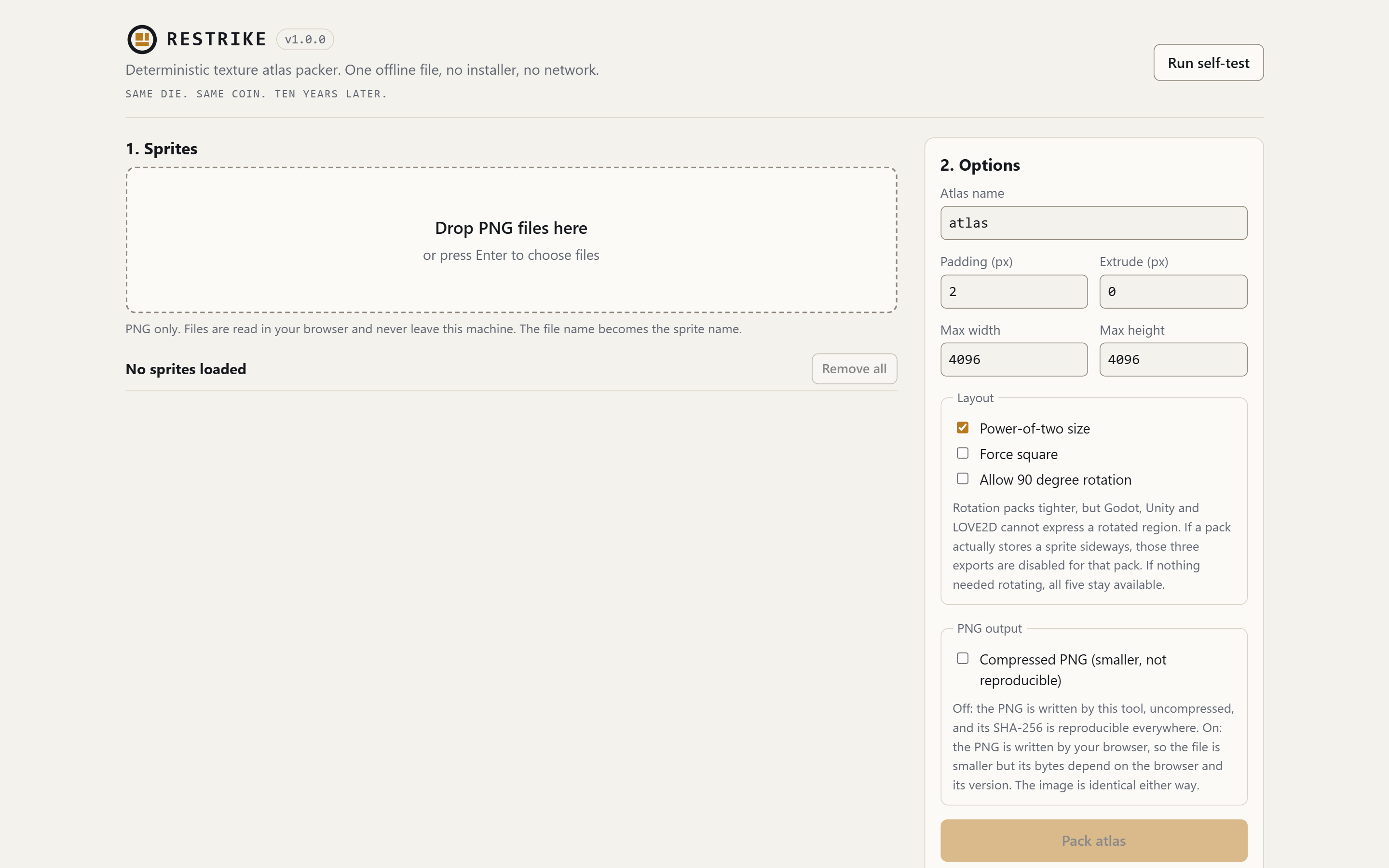
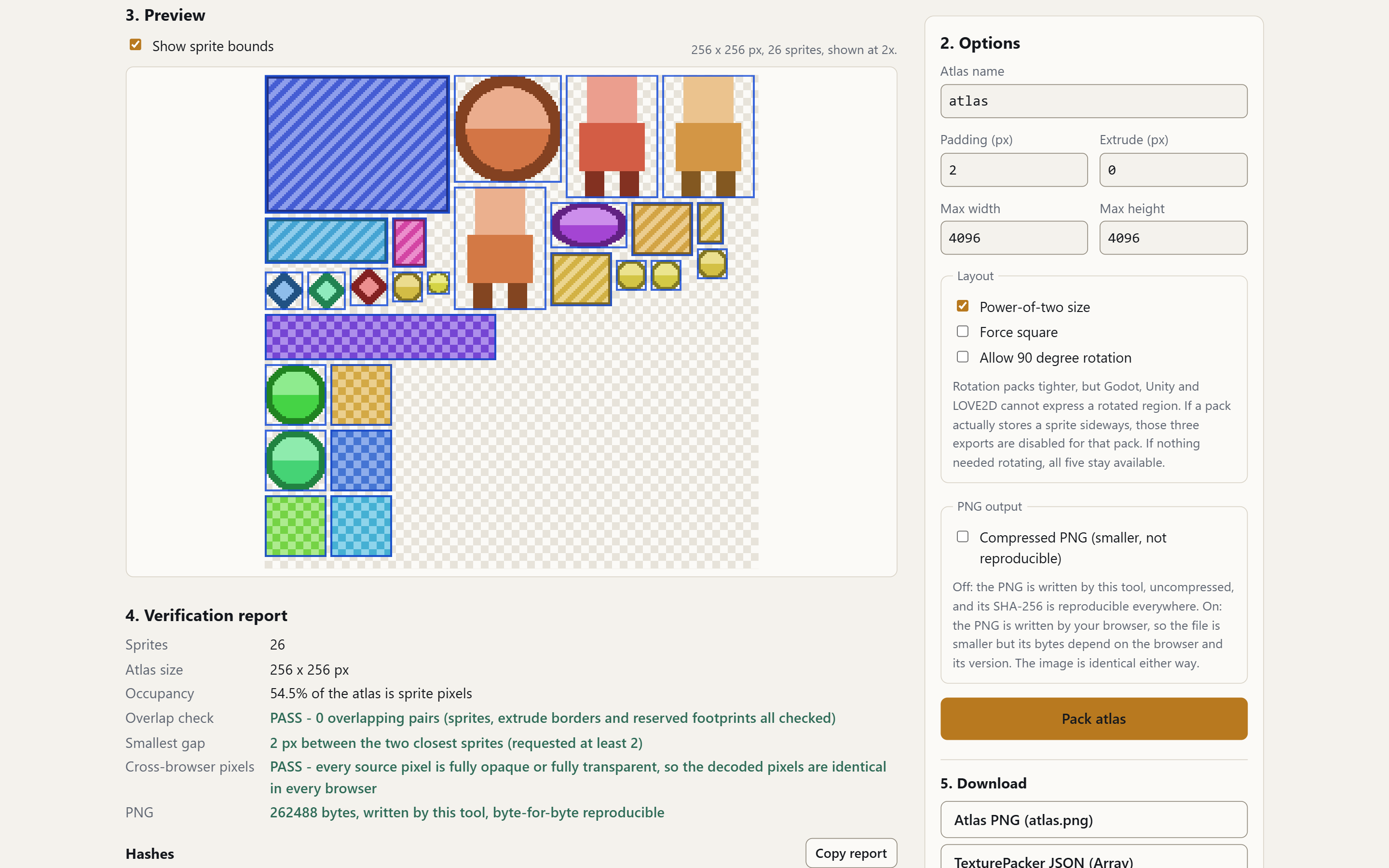
Drop PNG files onto the page, or pick them with the file selector. The tool packs them into one atlas using a MaxRects placement algorithm, shows you the result, and gives you the atlas PNG plus metadata for five engines as ordinary browser downloads.
You control padding, edge extrude (bleed), maximum atlas size, power-of-two and square rounding, and optional 90-degree rotation. Rotation is off by default, because a Godot AtlasTexture, a Unity SpriteMetaData and a LOVE2D Quad cannot describe a rotated region at all. If you turn rotation on and the packer actually ends up storing a sprite sideways, those three export buttons disable themselves, with a tooltip saying why, rather than writing a file that would be subtly wrong in your engine. (If rotation is on but nothing needed rotating, all five formats stay available, because there is nothing left for them to misrepresent.)
It makes zero network requests. You can verify that in five seconds: turn off your network adapter, then use it. Nothing changes, because nothing was ever being sent anywhere.
There is no licence key and nothing to activate, on purpose. The download is DRM-free: no key, no account, no check of any kind. It is your file, and it keeps working offline for as long as your browser does. If a new version is ever published it appears in your itch.io library at no extra cost, but nothing here depends on that: what you are buying is the file as it exists today. A tool you have to ask permission to run is a tool that stops working the day the permission server does.
Why the hash matters
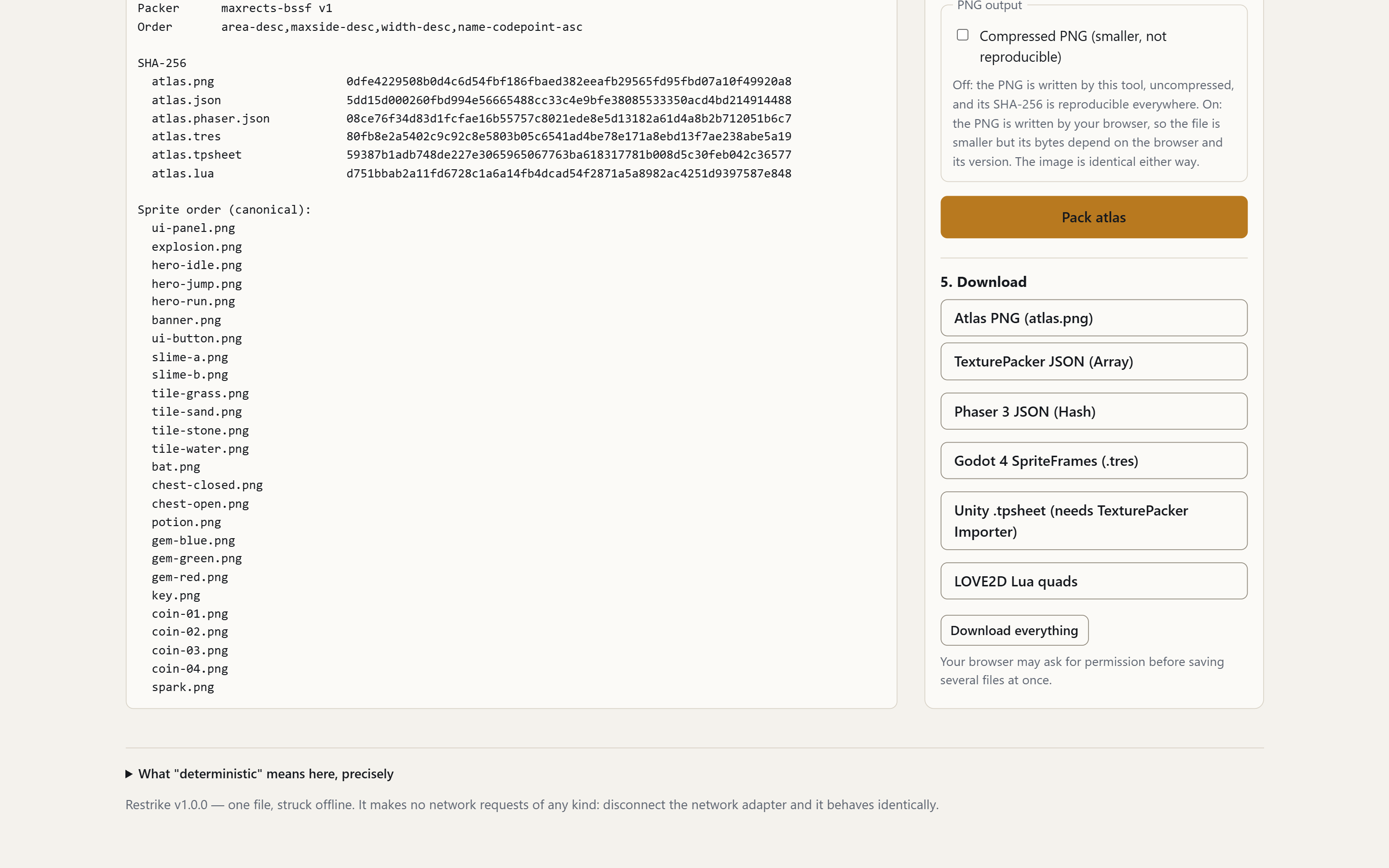
The packer is deterministic. The same input files, packed with the same version of the tool and the same settings, produce the same atlas PNG byte for byte, and therefore the same SHA-256 hash. Placement never depends on Math.random, on the clock, or on the order in which your operating system happens to hand the files to the browser. The tool sorts inputs into a documented canonical order before packing, and that order is shown in the verification report.
This is not a benchmark number. It is a practical property, and it is the reason the tool exists:
- Your version control stays quiet. Re-exporting an unchanged atlas produces an identical file, so it does not show up as a diff, does not re-upload, and does not fill your repository history with binary churn.
- Your build is reproducible. If the atlas hash matches the one recorded at the last release, the atlas is provably the same asset. If it does not match, something in the inputs actually changed, and you know to look.
- Bug reports become checkable. "The atlas is wrong" turns into a hash that either matches or does not.
Every pack produces a verification report containing: the sprite count, the atlas dimensions, the occupancy percentage, an explicit overlap check across every pair of placed rectangles, and the SHA-256 of both the PNG and the JSON. The SHA-256 is computed by an implementation written into the file itself, not by a browser API, so it behaves the same way when the page is opened from file://.
Three honest limits on the byte-for-byte claim, all of which the tool states in its own report rather than leaving you to discover:
- The reproducible atlas PNG is not compressed. A PNG's bytes are the output of a deflate compressor, and every browser and platform ships a different deflate build with different tuning, so a compressed PNG cannot be identical across machines. There is exactly one deflate mode with no tuning knobs at all - "stored" blocks, meaning no compression - and that is the one the tool writes. The result is a completely ordinary PNG that every engine loads normally, but it is roughly
width x height x 4bytes on disk: about 16 MB for a 2048x2048 atlas, about 67 MB for a 4096x4096 one. That size is the literal price of a hash you can compare. Read the next bullet and the "What it does not do" list before you decide it is worth paying. - Semi-transparent source pixels are browser-dependent. Reading pixels back out of a browser canvas goes through a premultiplied-alpha round trip whose rounding the HTML specification does not pin down, so two browsers can return values that differ by one unit for the same source PNG. Fully opaque and fully transparent pixels are unaffected, which is why hard-edged pixel art reproduces identically everywhere. The report counts your semi-transparent pixels and tells you which case you are in. The same browser always reproduces its own output exactly.
- The optional "Compressed PNG" tick box gives up reproducibility on purpose. It hands the encoding to your browser, which produces a far smaller file and a hash that other machines will not match. It is off by default, and the report labels its output "NOT reproducible" when you turn it on. Running the uncompressed export through oxipng or pngcrush afterwards is the same trade made by hand: identical pixels, and a file the report's SHA-256 no longer describes.
Export formats
One pack, five metadata outputs, each written by hand against the target format:
| Engine | Output |
|---|---|
| Godot 4 | One .tres SpriteFrames resource holding one AtlasTexture sub-resource per sprite, all referencing the shared atlas texture. Built into Godot 4: drop the .tres and the .png into res://, no plugin, no import script |
| Unity | A .tpsheet sprite sheet description. Unity cannot read this on its own - it needs the free third-party "TexturePacker Importer" editor plugin (by CodeAndWeb) from the Unity Asset Store. Without the plugin the .png still imports normally and you can slice it by hand, or feed the TexturePacker JSON to your own script |
| Phaser 3 | JSON Hash |
| LOVE2D | A Lua table of quads, plus a newQuads() helper |
| Generic | TexturePacker JSON Array, which many engines and importers already read |
The atlas itself is a plain PNG. If your engine is not on this list, the TexturePacker JSON Array output is the format most third-party importers accept.
Built-in self-test
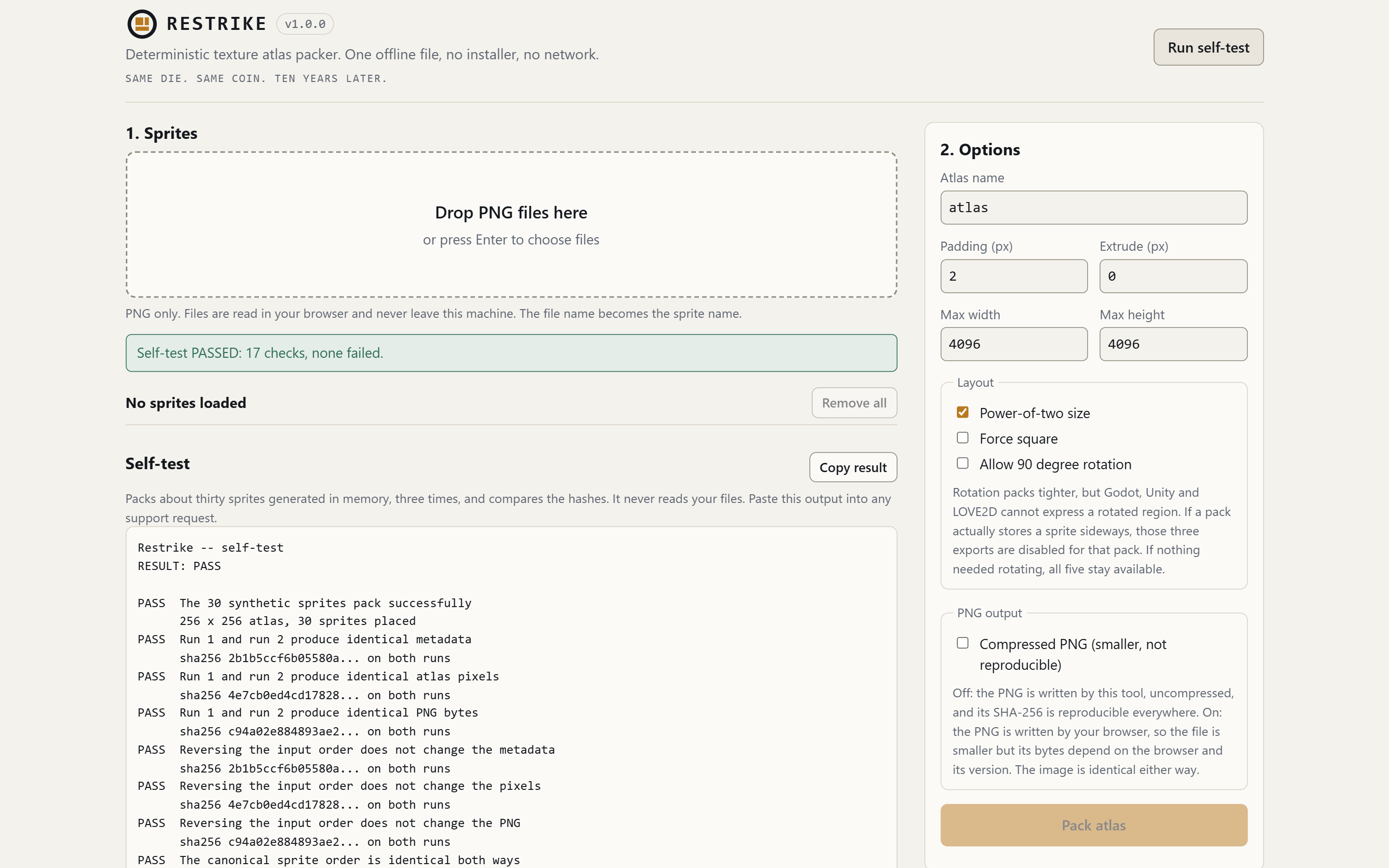
There is a button labelled "Run self-test". It generates 30 synthetic sprites in memory - including 1x1 pixels, extreme aspect ratios and transparent checkerboards, which is where packers break - and runs the real pipeline over them three times: twice in the same order, once in reverse. Then it runs 17 checks and prints a short report you can copy. Among them:
- the three SHA-256 hashes (metadata, atlas pixels, PNG bytes) are identical across the two identical runs;
- reversing the input order changes none of the three;
- no two sprites, no two extrude borders and no two reserved footprints overlap;
- the requested padding really is present between every pair;
- every sprite is byte-identical at the position the metadata claims;
- the extrude border repeats the sprite edge on all four sides, not just the one an optimistic test would have checked;
- the PNG is exactly the length the encoder predicted.
This is also the support process. If the tool ever misbehaves for you, run the self-test and send the output. It contains no image data and nothing from your project, so you can send it without disclosing anything you are working on.
What it does not do
An honest list. If something you need is on it, do not buy the tool yet.
- It does not generate bitmap fonts. If you searched for a bitmap font generator, this is not one. It packs PNG images.
- It does not trim transparent borders from sprites. Each PNG is packed at its full stored size. If you want tight bounds, trim before importing.
- It does not split output across multiple atlas pages. One pack produces one atlas. If your sprites do not fit inside the chosen maximum size, the tool says so instead of silently producing something else.
- It does not read PSD, ASE, Aseprite, SVG, JPEG, WebP, or GIF. PNG only, checked by the file's own signature bytes rather than by its extension.
- It does not handle animation timelines, tags, or 9-slice regions. It records rectangles and names. The Unity
.tpsheetcarries a pivot because the format requires one; it is always the centre of the frame, and there is no per-sprite pivot editor. - It does not compress textures to ETC2, ASTC, BCn, or Basis. The output is an ordinary PNG.
- It does not produce a small PNG in reproducible mode. The reproducible encoder stores pixels uncompressed, so expect roughly
width x height x 4bytes. Tick "Compressed PNG", or optimise the file yourself afterwards, if size matters to you more than the hash does. Both choices cost you the byte-for-byte promise, and the tool says so on screen when you make them. - It does not do polygon or mesh packing. Rectangles only.
- It has no command line, no batch mode, and no CI integration. It is a page you open and use with your hands.
- It does not auto-update, because it never contacts anything. Updates, if there are any, are new downloads from your itch.io library.
- It is bounded by browser memory. Very large sprite sets, or very large atlas dimensions, can exhaust the tab. There is no magic here; a browser tab is a browser tab.
Requirements
- A desktop browser released in roughly the last three years: Chrome, Firefox, Edge, Safari, or another Chromium-based browser. Tested end to end in Chrome and in Firefox, where the full run -- decode, pack, verification report and download -- is checked automatically on every release, and both browsers are asserted to produce the same atlas bytes as the reference implementation. Safari is expected to work and is not yet part of that automated run: the tool deliberately uses nothing Safari lacks -- no File System Access API pickers, no Web Crypto -- but expectation is not evidence, and this listing only claims what has been measured. Input is an ordinary file input plus drag-and-drop; output is an ordinary browser download.
- Any operating system that runs one of those browsers. There is no Windows-only binary and no Java runtime involved.
- No internet connection.
- No installation, no administrator rights, no npm, no Node, no Python.
The file is self-contained. Copying it onto a USB stick, into a repository, or onto a locked-down offline workstation is a supported way to use it.
What you download
restrike-v1.0.0.html   the tool; one file, and it is the whole product
LICENSE.txt            the licence, in plain language
The version is in the file name on purpose. If you ever write in about something, the name of the file you have already says which build you are running, and when a new version is published you can tell at a glance whether the copy on your disk is the current one. Every download of a given version has the same name and the same bytes: nothing in the file identifies you, your machine or your purchase.
Support
Email quartzon.dev@gmail.com. Include two things:
1. The output of the "Run self-test" button. 2. The verification report from the pack that went wrong.
Both are plain text and contain no image data whatsoever - no pixels, no thumbnails, no encoded payload. The self-test output mentions nothing but its own synthetic sprites. The verification report does list your sprites' file names, in the canonical order the packer used, because a name is what makes a packing problem identifiable. The only hashes in it are of the atlas PNG and of the metadata files the tool itself wrote; there is no per-sprite hash and no sprite dimensions. If a file name would itself tell us something about an unannounced project, rename the files before packing, or send only the self-test output.
Do not send your sprites. They will not be looked at, and they are not needed to diagnose anything.
Support is best-effort, in English and Spanish. There is no guaranteed response time and no service level agreement; see LICENSE.txt.
Licence
One purchase covers one person, for unlimited commercial use of the packer's output in your own projects, with no royalties and no per-project fee. You may not redistribute or resell the tool file itself. Full terms are in LICENSE.txt, included in the download.
Working in a team? Buy one licence per person who will actually open the tool. There is no seat pack and no volume discount: five people pay five times what one person pays. If you need one invoice for several licences, or a licence document made out to your company for a procurement process, write in and it gets written.
---
Purchase
In order to download this tool you must purchase it at or above the minimum price of $19 USD. You will get access to the following files:
Leave a comment
Log in with itch.io to leave a comment.